Free Phone from the Government — Find Out How to Apply Today
Staying connected is no longer a luxury — it’s a basic necessity for accessing healthcare, finding employment, managing finances, and keeping in touch with family. Yet for millions of low-income Americans, the monthly cost of a phone or internet plan remains out of reach.
Advertisement
That’s exactly why the federal government established the Lifeline program, managed by the FCC and administered by USAC, which provides eligible households with a monthly discount on phone or internet service — and in many cases, a free smartphone through participating providers, all at no cost to the beneficiary.
Advertisement
What makes Lifeline particularly accessible is that you don’t need to navigate complex paperwork or visit a government office to apply. The entire process is handled online through the National Verifier, an official government system that checks your eligibility in real time and, in most cases, delivers an instant decision.
How to Apply for the Free Government Phone
Before starting the application, have the following within reach: a government-issued photo ID, proof of your current address, and documentation related to your income or participation in a federal assistance program. Once you have those ready, follow the steps below:
Anúncios
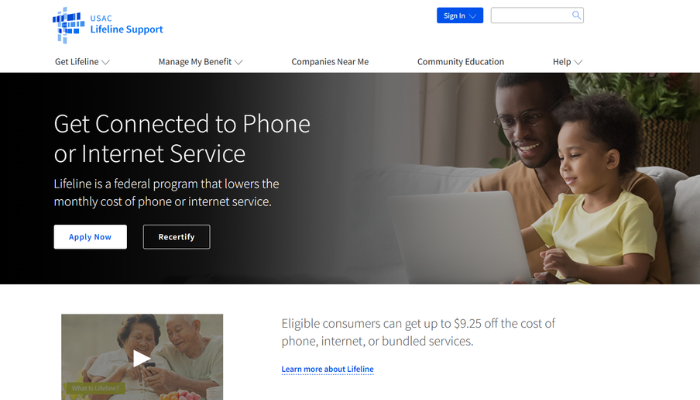
1. Go to the official National Verifier portal at lifelinesupport.org — this is the only government-authorized platform for Lifeline applications. Avoid third-party websites that claim to offer the same service, as many are scams.
2. Click on “Apply for Lifeline” on the homepage to begin the process.
3. Create a free account using your email address, or log in if you’ve applied before. Your account will be used to track the status of your application and manage your benefit going forward.
4. Fill in your personal information accurately: full legal name, date of birth, home address, and either the last four digits of your Social Security Number or your Tribal ID, depending on your situation.
5. Select the eligibility path that applies to you — either income-based or program-based. You’ll be asked to confirm which federal assistance programs you or a household member currently participate in, or to provide income details if applying by income.
6. Upload the supporting documents required to verify your eligibility. These may include a benefit award letter, a recent tax return, pay stubs, or proof of enrollment in a qualifying program. All documents must be dated within the past 12 months.
7. Submit your application and wait for the National Verifier to process your request. Many applicants receive an instant decision; others may be asked to provide additional documentation and wait up to 7 business days.
8. Once approved, choose a participating Lifeline provider in your area. Providers such as Assurance Wireless, Q Link Wireless, SafeLink Wireless, and TruConnect offer free smartphones as part of their Lifeline plans. You can search for available providers by zip code at lifelinesupport.org/companies.
Requirements to Apply for the Free Government Phone
Not every household qualifies for Lifeline, so it’s important to confirm your eligibility before applying. Qualification is based on either your household income or your participation in a qualifying federal assistance program — whichever applies to your situation.
Income-based eligibility: Your total household income must be at or below 135% of the Federal Poverty Guidelines for your household size and state. You may be required to provide proof of income such as a recent tax return or three consecutive months of pay stubs.
Program-based eligibility: You automatically qualify if you or any member of your household currently participates in one of the following federal programs:
- Supplemental Nutrition Assistance Program (SNAP / Food Stamps)
- Medicaid
- Supplemental Security Income (SSI)
- Federal Public Housing Assistance (FPHA)
- Veterans Pension and Survivors Benefit
- Certain Tribal assistance programs, for those residing on qualifying Tribal lands
Beyond the eligibility criteria, there are a few rules worth knowing before you apply. Only one Lifeline benefit is allowed per household — not per person. This means that if someone in your home already receives the discount, you are not eligible for a separate benefit at the same address. Additionally, if your provider does not charge a monthly fee, you must use the service at least once every 30 days to keep the benefit active. Eligibility must also be recertified every year, or you will be automatically de-enrolled from the program.
How to Know If You Were Approved?
After submitting your application through the National Verifier, the system will process your request and notify you of the outcome. In straightforward cases — where your information matches federal databases directly — the decision is typically instant and you’ll see a confirmation screen right after submission, along with an approval code to use when signing up with a Lifeline provider.
If your application requires manual document review, the process may take up to 7 business days. During this time, you can log back into your account at lifelinesupport.org at any point to check the current status of your request. The portal will show whether your application is still under review, approved, or denied — and if denied, it will clearly state the reason along with instructions on how to appeal or resubmit with corrected documents.
Once approved, take your approval code and visit the website or store of a participating Lifeline provider in your area to complete enrollment and receive your free phone or activate your discounted plan. Keep in mind that approval through the National Verifier is just the first step — you must complete enrollment with a provider before the benefit becomes active.
How to Contact Support
If something doesn’t go as expected during the application — whether it’s a login issue, a question about your eligibility, or a problem with your current benefit — always rely on official support channels. Reaching out through unofficial websites or social media pages that claim to represent the program is risky and often leads to misinformation or fraud attempts. Use only the verified contacts below:
- Lifeline Support Center (USAC): Call 1-800-234-9473, available Monday through Friday from 9 AM to 9 PM Eastern Time. You can also reach the team by email at LifelineSupport@usac.org. Have your Social Security Number or application ID ready when calling to speed up the process;
- Online contact form: For written inquiries about your application or benefit status, visit lifelinesupport.org/contact-us and submit your question directly. Responses are typically sent within a few business days;
- FCC Consumer Help Center: For broader questions about the Lifeline program, your rights as a consumer, or to report fraud, visit fcc.gov/consumers or call the FCC at 1-888-225-5322. The FCC also operates a dedicated Lifeline Fraud Tip Line at 1-855-455-8477 for reporting suspicious providers or suspicious activity;
- Your Lifeline provider’s customer service: Once enrolled, your chosen provider — whether Assurance Wireless, SafeLink, Q Link, or another — has its own dedicated support team for device issues, plan questions, and service-related concerns. Contact information is available on each provider’s website.
The Lifeline program has been connecting low-income Americans since 1985 — and in 2026, it remains one of the most direct and accessible ways to get phone or internet service without the financial burden. Whether you qualify through income or through a federal program you already participate in, the application is free, takes just a few minutes online, and could put a working smartphone in your hands at no cost. Don’t leave this benefit unclaimed — check your eligibility today at lifelinesupport.org and take the first step toward staying connected.